
 By
By 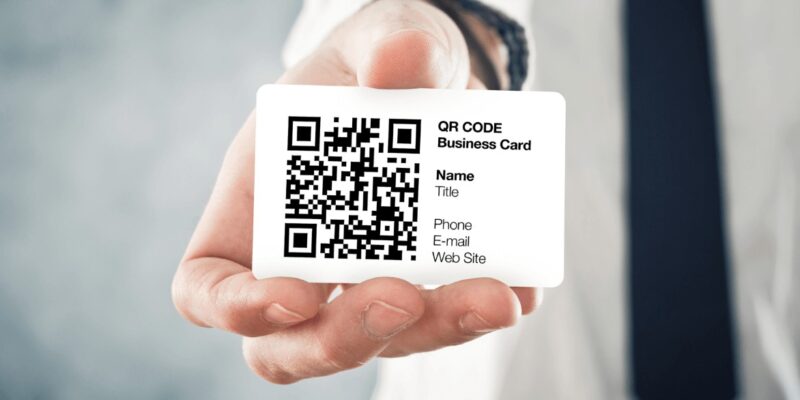
A business card qr code is a scannable code printed on your business card that instantly directs someone to your website, LinkedIn profile, digital contact card, portfolio, or any link you choose. When someone scans it with their phone camera, they are taken straight to whatever you want them to see next, with no typing required.
It’s one of the simplest upgrades you can make to a business card. Instead of a phone number someone might mistype or an email they have to manually enter, a QR code gets people into your world in one tap. And if you use a dynamic QR code, you can change where it points anytime – without reprinting a single card.
What Can You Link a QR Code To?
| Link Type | Best For | Example Use |
| Website / Landing Page | Any business | Send people to your services page or homepage |
| vCard / Digital Business Card | Networking events, sales reps | One tap saves your contact to their phone |
| LinkedIn Profile | B2B, job seekers, consultants | Grow your professional network instantly |
| Portfolio / Behance / Dribbble | Designers, photographers, creatives | Show work without printing samples |
| Booking / Calendly Link | Coaches, consultants, service providers | Let them schedule a call on the spot |
| WhatsApp / Phone Link | Local businesses, personal brands | Start a chat immediately |
| YouTube / Video Demo | Product businesses, speakers | Show rather than tell |
How to Create a Business Card QR Code (Step by Step)
You don’t need design skills or paid software to do this. Here’s the fastest free method:
- Go to QR Code Generator (qr-code-generator.com) or Canva.com – both are free to start.
- Choose the QR type: URL, vCard, email, phone, or social media.
- Enter the destination – paste your link or fill in your contact details.
- Customise the colours and shape to match your brand (optional but recommended).
- Download as SVG or high-res PNG (minimum 1000x1000px for print).
- Test the code with your phone camera before sending to print. Do this twice.
Static vs Dynamic QR Codes – Which Should You Use?
| Static QR Code | Dynamic QR Code | |
| Cost | Free | Usually requires paid plan ($5-$15/mo) |
| Can you edit the destination? | No – fixed forever | Yes – change anytime without reprinting |
| Scan tracking / analytics | No | Yes – scans, location, device data |
| Best for | One-time use, small print runs | Business cards, marketing materials |
| Code complexity | More complex visually | Cleaner, simpler pattern |
Recommendation: If you print more than 50 cards or plan to reuse them for a year, invest in a dynamic QR code. Changing jobs? New website? You update the link – not the cards.
Design Tips: Making the QR Code Look Good on Your Card
- Minimum size: 1.2cm x 1.2cm (0.5 inch) on printed cards. Smaller than this and many phones can’t scan.
- High contrast is non-negotiable: dark code on light background. Avoid yellow, light grey, or pastel codes – they fail in dim lighting.
- Add a short CTA label above or below the code: ‘Scan to connect’ or ‘View my portfolio’. People hesitate less when they know what’s coming.
- Don’t cover more than 30% of the code with a logo overlay – beyond that, error correction can’t compensate.
- Leave a white quiet zone (border) around the code. Printing right to the edge causes scan failures.
Do’s and Don’ts at a Glance
| ✅ Do This | ❌ Avoid This |
| Test scan before printing | Use light colours on light backgrounds |
| Use dynamic QR for long-term cards | Print at less than 1.2cm size |
| Add a CTA next to the code | Link to a page that isn’t mobile-optimised |
| Export as SVG or high-res PNG | Use a free static code for cards you’ll reorder |
| Keep destination link short & clean | Skip testing and assume it works |
Tracking Scans Without Reprinting
If you used a dynamic QR code through tools like Bitly, Beaconstac, QR Tiger, or Canva Pro, you get access to a dashboard that shows:
- Total scans and unique scans
- Location of scans (country, city)
- Device type (iOS vs Android)
- Time and date of each scan
This turns your paper business card into a trackable marketing asset. Not bad for something that costs less than a cup of coffee to set up.







Comments